This complete guide walks you through everything you need to create stunning images with Midjourney, from your very first text prompt to advanced prompts that rival professional concept art. Whether you want to generate amazing images for a client project, social media campaign, or personal creativity, the process starts with understanding how to talk to the model.
Quick Start: Your First Effective Midjourney Prompt in 2 Minutes
Short prompts typically generate the best images in Midjourney, so let's start with one you can paste right now:
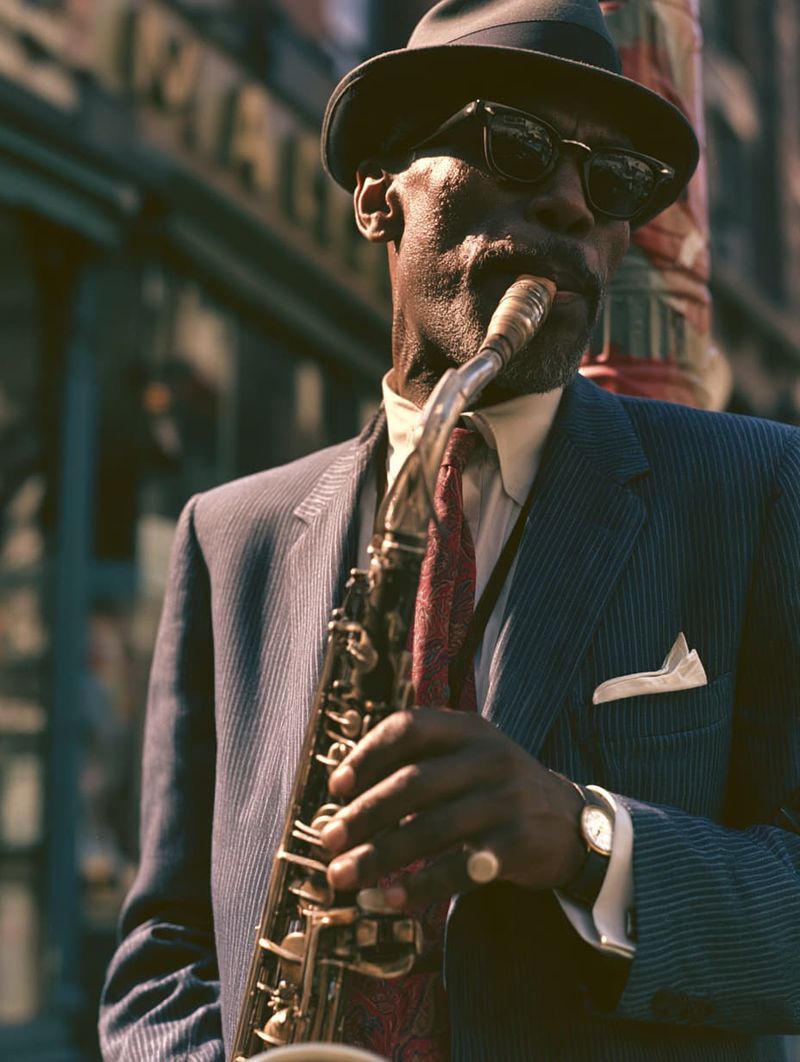
cinematic portrait of a jazz musician in New York, 1962, hyper realistic, cinematic lighting, 50mm lens, Kodak Portra 400, --ar 3:4 --v 8.1
Here's what each part does: jazz musician in New York, 1962 is your main subject and context. Hyper realistic and cinematic lighting define the artistic style and mood. 50mm lens, Kodak Portra 400 tells Midjourney how to render the picture. Telling Midjourney how to render the image can dramatically change the final result. The parameters at the end control the aspect ratio and model version.
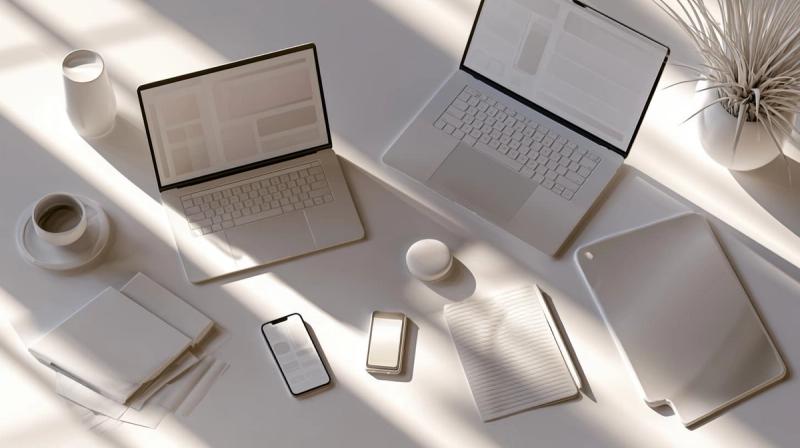
A second example for designers:
flat lay of startup desk branding, clean UI mockups on laptops and phones, soft daylight, birds eye view, minimal, --ar 16:9 --v 8.1
The Rule of 4 for Basic Prompts
Remember the "Rule of 4" for any basic prompt:
- Subject, what's in the picture
- Style, how it looks (oil painting, digital art, photo)
- Lighting, what illuminates the scene
- Format, parameters like aspect ratio and quality
How Midjourney AI "Thinks": The Mental Model Behind Prompts
Understanding the Model
Think of Midjourney AI as a visual "autocomplete" trained on billions of images and captions. It doesn't paint, it predicts what image best matches your words based on statistical patterns in its training data.
- Midjourney prompts are interpreted as bags of concepts. Importance comes from frequency and clarity of your words, not perfect grammar. Midjourney can even generate images from single words or emojis.
- In V6 and V8.1, word order has a subtle influence, but strong nouns and adjectives matter far more than sentence structure.
- Longer doesn't mean better. Beyond roughly 60 words, the model starts dropping or weakening concepts at the tail end of your prompt.
Visual vs. Subjective Language
Midjourney responds best to concepts that can be directly represented visually. Specific visual descriptors like "rim light" or "shot on 35mm" communicate far more effectively than subjective adjectives like "nice" or "cool." Using vague words is generally less effective than precise visual traits in prompts.
Midjourney Prompt Anatomy: From Basic to Advanced Prompts
Prompt Structure Examples
A good formula for prompts follows this structure: Subject → Environment → Style → Lighting → Composition → Parameters. Or put another way: [subject] + [environment] + [style] + [lighting] + [quality cues] + [parameters].
Here's a simple prompt versus its upgraded version:
| Basic prompt | Advanced prompt |
|---|---|
| dog in a park | golden retriever puppy running across a dew-covered meadow at sunrise, warm golden hour light, wide angle, shallow depth of field, cinematic nature photography --ar 16:9 --v 8.1 --q 2 --s 150 |
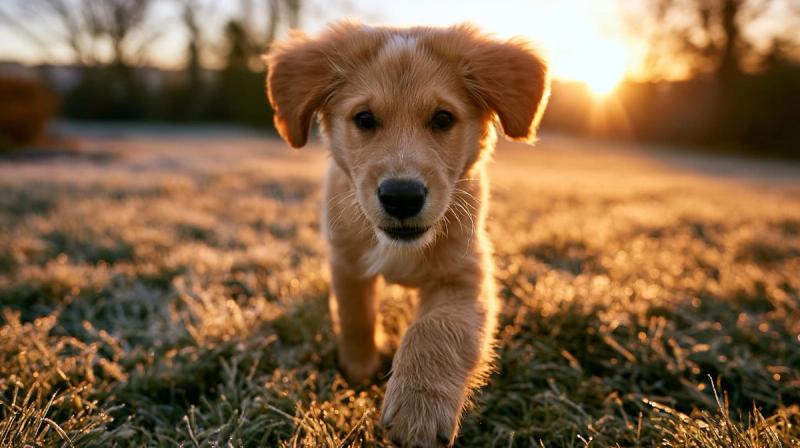
Detailed descriptions help generate more accurate images in Midjourney, and detailed prompts help achieve desired artistic styles. The more specific you are in your prompt, the more likely Midjourney will match your vision.
Common Style Tags and Contextual Elements
Common style tags in 2026 include:
- "
hyper realistic" - "
studio portrait" - "
digital illustration" - "
oil painting" - "
concept art" - "
pixel art" - "
flat vector illustration"
Add mood and storytelling with:
- Era ("
1980s") - Weather ("
rainy night") - Emotion ("
melancholic") - Location ("
Tokyo back alley")
These different elements ground your image generation in a concrete context.
Word Order, Keywords & Prompt Length
Word order matters less than coverage, but the earliest words in a prompt have the strongest influence on the composition. Cluster related terms together to help the model connect ideas.
For instance, running the same prompt with identical words in a shuffled order using a fixed --seed produces similar but not identical results - proof that order exerts subtle control.
Prompt Length Guidelines
- Sweet spot: 20–60 words for most Midjourney prompts
- Priority order:
subject→style→lighting→extra details - Concise descriptive prompts are preferred over long conversational sentences
- Be aware that overly detailed prompts can make Midjourney less creative
- Avoid stuffing conflicting concepts (e.g., "stormy cyberpunk city" + "sunny beach") unless you're intentionally blending ideas
- Use specific numbers instead of vague plural words - write "three cats" instead of "many cats"
Meaningful visual information is generally more effective than long strings of superlatives in prompts.
Concrete Prompt Templates for Common Use-Cases
Fill in the blanks and generate images immediately:
Portrait template: hyper realistic portrait of [person/role], [emotion], [age], [environment], cinematic lighting, [camera lens], --ar 3:4
Product template: studio product photo of [object] on [surface], soft diffused lighting, high detail, 8k, shot on [camera model], --ar 16:9
Illustration template: [style] illustration of [subject] in [setting], bold shapes, clean line art, flat colors, suitable for web, --ar 1:1
Environment template: [location], [era or year], [weather], [time of day], wide shot, cinematic color grade, --ar 16:9
Using specific numbers improves prompt clarity and results - say "two coffee cups" instead of "some coffee cups."
Midjourney Parameters You Actually Need in 2026
You don't need to memorize every flag. Specific parameters adjust aspects such as aspect ratio, artistic style, and compositional control, so focus on the ones that matter. Midjourney has nine parameters for image customization, but these are the essentials. Parameters are added to the end of your prompt in Midjourney, and they map to concrete actions such as upscaling, variations, and inpainting.
| Parameter | What it does | Range / Default |
|---|---|---|
| --v | Model version | Default is now 8.1 |
| --ar | Aspect ratio | Any ratio, default 1:1 |
| --stylize / --s | Artistic flair vs literal | 0–1000, default ~100 |
| --quality / --q | Detail vs speed | 0.5, 1, 2 |
| --seed | Reproducibility | 0–4,294,967,295 |
| --chaos / --c | Variation across the four images grid | 0–100 |
| --no | Negative prompt exclusions | Any terms |
| --weird / --w | Experimental creativity | 0–3000 |
| --iw | Image weight for image prompts | 0–2 |
Aspect Ratio: Framing for Web, Print, and Social
Aspect ratio is expressed as two numbers separated by a colon, width to height. Choosing the right one before you iterate saves you from redoing work later.
Battle-tested choices:
- 16:9 for YouTube thumbnails and hero banners
- 4:5 or 1:1 for Instagram feed posts
- 9:16 for TikTok, Reels, and Stories
- 3:2 for print-like photos
Example: confident CEO headshot, modern office, studio lights, --ar 4:5 --v 8.1
Extreme aspect ratios (like 14:1) can distort composition and may require prompt adjustment. Decide your aspect ratio before iterating on style to avoid redoing the look.
Stylize, Quality & Weird: The Creative Dials
The stylize parameter influences the artistic style of generated images - think of it as a "midjourney flavor" slider:
--s 0–100: Literal, product-focused. E.g., studio product photo of a ceramic mug, white background--s 25--s 200–600: Balanced art. E.g., watercolor cat sitting on a windowsill, afternoon light--s 400--s 800+: Heavily stylized. E.g., ancient temple ruins, fantasy concept art--s 900
Quality (--q) is a time vs detail trade-off:
- Use
--q .5for fast exploration - Use
--q 1for standard work - Use
--q 2for final art
The weird parameter pushes creativity into surreal territory: melting clock garden, dreamscape, impossible architecture --w 1200 --ar 16:9. Check the official Midjourney parameter documentation for exact limits in 2026, as compatibility changes across versions.
Lighting, Camera Angles and Composition: Making Images Look "Expensive"
Professionals treat Midjourney like a camera and lighting rig. Telling Midjourney how to render the image, specifying light types, angles, and mood, is what separates flat snapshots from cinematic results. For a deeper look at how these choices shape realism, see our guide on how prompt engineering shapes photorealistic images.
Lighting Techniques
Useful cinematic lighting terms include:
Volumetric lightingRim lightBacklightingChiaroscuroDramatic shadowsCinematic hazeGolden hourStudio lights
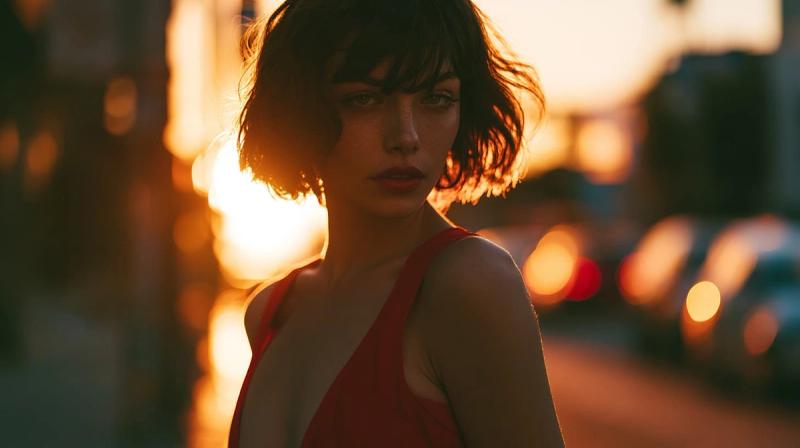
Without lighting: portrait of a woman in a red dress, city street
With lighting: portrait of a woman in a red dress, city street at dusk, warm golden hour backlight, rim light on hair, moody high contrast, close up, 85mm lens
The difference is dramatic. Always describe light source, direction, and mood.
Camera Angles and Lenses
Shot types that work well as prompt keywords:
Close up- tight on face or object detailsMedium shot- waist up, good for character workWide shot- full body or scene establishingLow-angle shot- heroic, powerful feelingBird’s-eye view / aerial- top-down perspectiveMacro- extreme detail on small subjects
Lens cues shape perspective:
- "
35mm" for a wide-angle environmental context - "
85mm portrait lens" for shallow depth of field - "
Telephoto" for compressed backgrounds - "
Tilt-shift" for miniature effects
Example for game key art: low angle shot, 35mm lens, shallow depth of field, armored knight standing before a burning castle, hyper realistic, photojournalism style --ar 16:9
Camera terms are especially effective when combined with hyper-realistic or photographic-style references. Build a personal "visual vocabulary" list of your favorite camera and lighting words for reuse.
Advanced Prompts: Characters, Consistency, and Complex Scenes
Building Layered Prompts
This is level 2 for users who know the basics and want more control.
Build prompts in layers:
- Subject first
- Then environment
- Then the style and lighting
- Then the fine details
Use the same --seed to evolve a composition without starting over. To create a recurring character, keep consistent descriptors (age, hair color, clothing, era, and color palette) across every generation. If you're coding this behavior, a unified image generation API makes it easier to standardize those parameters across models, and our guide on keeping AI-generated characters consistent walks through the same problem in more technical depth.
Managing Complex Scenes
For complex multi-character scenes, use "prompt slots":
- [hero]
- [supporting character]
- [setting]
- [action]
- [camera angle]
But don't forget: overloading a single Midjourney prompt with too many distinct focal points (5+ characters, multiple locations) reduces reliability. Keep it focused.
Negative Prompts and Controlling What You Don't Want
The --no parameter lets you exclude elements:
--no text--no watermark--no border--no blur
Common fixes:
- Extra limbs →
--no extra fingers,--no extra limbs - Generic stock photo feel →
--no stock photo,--no cheesy - Unwanted logos →
--no logo,--no brand
Use positive phrasing first ("clean plain background"), then reinforce with negatives. Avoid negative language in the main text description to prevent unintended outputs, save exclusions for --no. Start with 1 to 2 key exclusions, since too many can conflict. Some requests involving trademarks or real people are also restricted by Midjourney's own content policies, so it's worth checking Midjourney's official documentation for current restrictions before a prompt silently fails.
Image Prompts, Blending, and Image Weight
Using Image Prompts
Image prompts let Midjourney build on reference images: photos, logos, sketches, or style inspirations. Paste image URLs in the /imagine command or use /blend to combine 2 to 5 images. For a broader look at working with reference images across models, see our guide on how to use reference images in AI image generation.
The --iw (image weight) parameter controls adherence:
- Low values for looser interpretation
- Higher values (up to ~2 in V8.1) for closer matches
This is powerful for turning a portrait photo into a stylized character while retaining facial structure. If you want to see how Midjourney's approach to reference-based generation compares to Flux and Stable Diffusion, our Flux vs Stable Diffusion vs Midjourney API guide breaks that down in detail.
Always use original or licensed reference images. Using copyrighted content or real people's photos raises ethical and legal concerns.
Practical Blending Recipes
Three concrete blend use cases:
- Blending a hand-drawn wireframe with a UI screenshot to ideate new app layouts
- Combining a logo with a pattern photo to generate branded backgrounds for 2026 campaigns
- Merging a product photo with a fantasy environment for imaginative ads
Textless /blend is great for quick exploration, while adding a short text description like "minimal poster design, pastel colors" refines direction. Start with visually compatible images before trying extreme contrasts. Save strong blends as style references to reuse across a project for brand consistency.
Prompting Best Practices & Common Mistakes to Avoid
Consistent practice plus a few guardrails will drastically improve your results. Comparing how different models interpret the same brief using a comparison of the best AI image APIs, including Midjourney, Flux, and Stable Diffusion, will also sharpen your prompting instincts. Here's the answer to most prompting frustrations:
Best Practices
- Be clear on your main subject and viewpoint
- Describe style in concrete, referenceable terms
- Always specify lighting for anything realistic or cinematic
- Choose the aspect ratio early
Common Mistakes
- Overly long, unfocused prompts that dilute the image
- Mixing conflicting styles ("minimalist" plus "super detailed" without intention)
- Relying on "make it better" instead of naming specific changes
Using synonyms can improve the clarity of your prompts. Swap "epic" for "grand cinematic" if Midjourney misinterprets a word. Grammar is optional: commas and line breaks work fine. Focus on strong, visual keywords.
Example Gallery: Best Midjourney Prompts for 2026
Here are some of the best Midjourney prompts across genres. Copy, remix, and build your own library.
1. Cinematic Portrait
hyper realistic cinematic portrait of a weathered fisherman, age 65, close up, golden hour side lighting, 85mm lens, shallow depth of field, film grain, --ar 3:4 --v 8.1 --q 2
Why it works: specific person details, precise camera and lighting, portrait-optimized aspect ratio.
2. Mobile Game Illustration
stylized 2D illustration of a fox warrior holding a glowing sword, enchanted forest, bold shapes, vibrant colors, suitable for mobile game UI, --ar 1:1 --s 500
The high stylize value encourages painterly creativity.
3. Product Hero Shot
studio product photo of a matte black wireless speaker on polished concrete, soft diffused lighting from above, high detail, 8k, --ar 16:9 --style raw --s 30
Low stylize + raw style keeps the medium product-accurate.
4. Sci-Fi Environment
abandoned space station corridor, flickering emergency lights, volumetric fog, wide shot, moody cyberpunk atmosphere, concept art for film, --ar 21:9 --s 600 --v 8.1
Wide aspect ratio creates a cinematic film-still composition.
5. Minimal Poster
minimal poster design, single geometric shape, muted earth tones, grain texture, modernist painting influence, --ar 2:3 --s 200
Restraint in the prompt produces clean, focused art.
ii
Each example uses real visual elements, specific camera or style ideas, and deliberate parameters. Encourage yourself to describe what you see in your head - that's how you generate images that match your vision.
From Average to Outstanding: Building a Prompting Workflow
Moving beyond "slot machine" usage means adopting a simple iteration loop:
- Start with a clear, short prompt and chosen aspect ratio
- Generate four images and note what you like or dislike
- Refine wording - lighting, angle, style - instead of starting from scratch
- Lock a
--seedonce you like the overall composition - Push quality (
--q 2) and resolution (--hd) for your final generation
Keep a prompt log, a Notion page, or a simple spreadsheet, with before and after examples and notes about what each change did. Tracking your prompt iterations this way tends to speed up how quickly you learn what works, especially if you're experimenting across several AI models for image, video, and music generation.
Combining human art direction with Midjourney AI leads to faster, more consistent design output in 2026 workflows. The ability to control every element, from subject to mood to composition, is what turns a simple prompt into a professional creative tool.
Start experimenting with advanced prompts, parameters, and image references today. Every generation teaches you something new, and the suggestions in this post are just the beginning. If you're a developer, our roundup of Midjourney API alternatives is the next step toward turning these techniques into real products. Build your personal "visual language" with Midjourney, and the quality of your work will compound with every session.