A good remove background API can cut hours from image work. But the tools make different bets: remove.bg focuses on visual realism, while Imagga emphasizes AI accuracy. Here are the three strongest options for developers, plus the trade-offs that matter before you ship.
1. Apiframe
Apiframe is a unified API for AI images, video, and music. Its image editing API includes dedicated background removal models, so it fits teams that want one developer-facing connection instead of separate model providers. The AI image editing API guide also explains how background removal fits into broader automated image workflows.
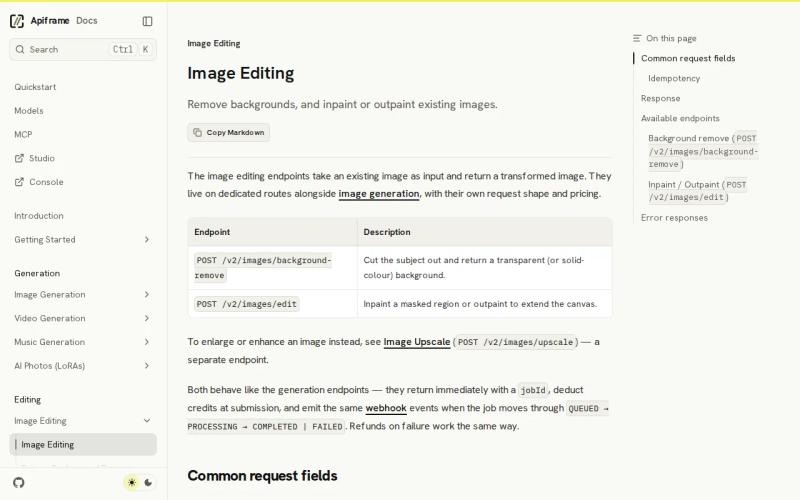
For background removal, Apiframe gives you a single endpoint:POST /v2/images/background-remove. You select the model in the request body. The available options include models for cleaner alpha edges and models for lower-cost, high-volume jobs.
The workflow is familiar to developers. Send an image URL with your API key, receive a job ID, then poll the job or use a webhook. The completed job returns an image hosted on the Apiframe CDN. That same pattern also applies across the platform's other media models.
Apiframe's image editing documentation lists the request routes, model IDs, output formats, and job flow. The selected model supports PNG output with transparency, plus options such as white, blur, overlay, and green backgrounds. That gives you room to build a product image pipeline without adding a second image service.
Use Apiframe when your app may need more than a cutout. A commerce tool might remove a product background today, then add inpainting or outpainting later. A creative app might switch between several image models while keeping one key and one billing setup. You can review the wider API documentation for images, video, and music before writing your integration.
The main caveat is choice. You still need to test the models against your own image set. Fine hair, glass, fur, and motion blur can expose edge defects, so don't judge quality from one clean product photo.
Apiframe is the best first test when you want background removal inside a broader AI media stack. Start with a small set of hard images, not only the easy ones.
Key Takeaway: Apiframe is the strongest fit when you want background removal plus access to other AI media models through one API.
2. remove.bg, Background replacement and realistic shadows
remove.bg is a background removal API option for teams that care about the final look, especially product images and portrait assets. A free tier is available, along with a feature that can replace the background while adding realistic shadows.

That shadow detail changes the workflow. A plain transparent cutout can look like it floats when you place it on a new scene. A generated or added shadow gives the subject visual weight, which is useful for catalog cards, car listings, and simple promotional layouts.
The vendor's own homepage describes use cases that include white backgrounds for e-commerce, transparent PNG files, logos, graphics, and headshots. This option also supports background replacement with realistic shadows as its distinct strength.
This makes remove.bg a good pick for a design-led workflow. Say your app lets a shop owner upload a shoe photo. The output may need to land on white for a product page, then on a new scene for a campaign tile. A shadow can save a later editing pass.
The free tier is useful during early tests. Only one of the two APIs compared here offers free access, so free testing isn't common across this small set. Still, check the current plan terms before you build a production forecast. The source material doesn't document a fixed price, image limit, or batch allowance.
There is a data gap here. Public documentation doesn't confirm maximum resolution, response time, or batch limits. Those fields matter if you process a large catalog or need a strict upload timeout. Run your own tests before promising a speed target to customers.
Choose remove.bg when the visual handoff matters more than model switching. It is especially worth testing for product shots where a transparent cutout alone looks too flat.
3. Imagga Background Removal API, AI-powered accuracy
Imagga Background Removal API is aimed at teams that put AI-powered accuracy first. It is marketed as background removal with “unseen accuracy,” while giving no indication of a free tier.
That positioning suits workflows where the mask is the main product. A bulk media system may pass the returned cutout into its own layout engine, storage layer, or image compositor. In that case, a clean subject boundary matters more than built-in scene styling.
Treat the accuracy claim as a reason to test the API, not as a substitute for testing.
Imagga may fit a team that already has a clear media pipeline. For example, you might receive a seller's image, remove the old background, then apply your own brand template. Keeping those later steps in your system can give you more control over crop rules and asset storage.
The trade-off is access during evaluation. That doesn't decide the quality question, but it can affect how you compare outputs across a large test set.
Use a test set that reflects your users. Include dark objects on dark scenes, loose hair, thin cables, transparent parts, and motion blur. Save both the source and returned mask so your team can inspect failures instead of judging only the full image.
Imagga is the better candidate when algorithmic precision is your first filter. You may still need another service for background replacement, shadow work, or broader media generation.
Pro Tip: Test every API with the same 20 to 50 source images, then score edge quality by image type. A clean product photo can hide the flaws that appear on hair, glass, and motion blur.
Remove Background API Comparison
The short comparison below uses only the fields captured in the research. It avoids guessing about speed or scale because those details were missing for both reviewed APIs.
| Option | Best fit | Distinct angle | Free tier noted | Resolution, latency, batch data |
|---|---|---|---|---|
| Apiframe | Teams building a wider AI media workflow | One API with dedicated background removal models | — | Check your test results and current docs |
| remove.bg | E-commerce and visual content workflows | Background replacement with realistic shadows | — | — |
| Imagga Background Removal API | Teams focused on cutout accuracy | AI-powered accuracy | — | — |
Apiframe is the most flexible starting point for a product team because it keeps background removal beside other image editing models. remove.bg deserves the first test when shadows and background swaps shape the user experience. Imagga belongs in the same test set when mask quality is the main concern.
Before launch, record four values for each candidate: success rate, edge quality, processing time, and cost per accepted image. The current public data does not fill those gaps for this comparison, so your own test run has to do that work.
Key Takeaway: Pick by workflow, then verify the choice with the same image set and acceptance rules.
FAQ: Remove Background APIs
What is the best remove background API?
Apiframe is the best first choice for teams that need background removal inside a wider AI media app. It uses one API for image models and supports dedicated background removal routes. Test remove.bg when realistic shadows matter most. Test Imagga when your main concern is the quality of the subject mask.
Does remove.bg have a free tier?
Public documentation does not state the current quota or production limits. Confirm plan rules before you use it in a paid customer workflow.
Which API is best for high-volume background removal?
There is no verified winner for high-volume work on published figures alone. Apiframe includes a high-volume option, while remove.bg and Imagga do not publish comparable batch or latency figures. Send the same batch size through each option and measure accepted images per hour.
Can a background removal API add a new background?
Yes, remove.bg is specifically noted for replacing a background and adding realistic shadows. Basic cutout APIs may return transparency without handling the new scene. If your app needs both steps, check whether the provider supports replacement directly or plan a second image-editing call.
Relevant evaluation criteria include edge quality, failure rate, response time, output format, and cost per accepted image. A representative set can include hair, fur, glass, dark-on-dark subjects, and motion blur. Also check how the API handles bad URLs and retries. Use these criteria rather than relying on a single clean product photo.
Conclusion
Start with Apiframe if you want a remove background API that can sit beside other AI image and media workflows. Test it against the same difficult images you plan to process in production, then compare the accepted output with remove.bg and Imagga. Try the background removal endpoint first, and move to a higher-quality model when your edge tests call for it.