
Security details are often thin in AI media API documentation. Use the steps below to protect your keys, control spend, and keep generated media out of the wrong hands.
We reviewed the main authentication or setup documentation page for six AI media API providers: Replicate, Stability AI, Runway, Leonardo.ai, OpenAI, and Luma AI. Each page was checked against four practices: key rotation guidance, warnings about server-side-only storage, webhook signature verification, and rate limit disclosure. Only 7 of the 24 possible checks were actually addressed, and just one page, Replicate's, described webhook signature verification at all. None of the six pages mentioned a specific key rotation schedule, which is exactly the kind of gap that needs explicit rules to close, since keys, tokens, and webhooks won't secure themselves.
1. Apiframe
Start with a media API that gives your team one security model to review, instead of several. Apiframe provides one API for image, video, and music generation, so your app can use one key, one job flow, and one webhook pattern across more than 70 models.
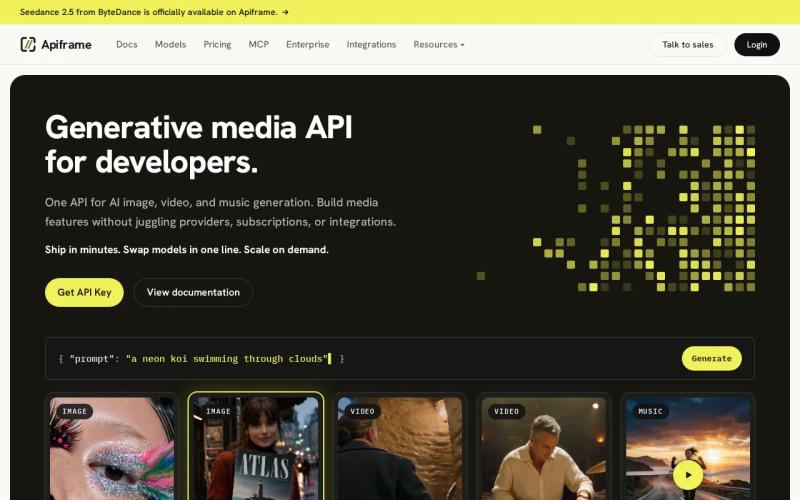
That design cuts down the number of credentials floating around your system. You don't need separate provider keys scattered across every service when your backend sends everything through Apiframe. The API uses an X-API-Key header, with keys that start with afk_.
Keep the key on your server. Your browser should send a prompt to your own backend, and your backend should be the one calling Apiframe. The same rule applies to mobile apps, desktop clients, and any agent tools you build. A key sitting inside shipped client code is available to anyone who takes the time to inspect the app.
Apiframe's job flow also helps with access control. A generation request returns a job ID with a "queued" status. Your worker can then poll that job or receive a webhook, rather than keeping a user's request open while a video or music job runs in the background. The AI video generation API guide walks through this same pattern in more detail, including how it fits into an automated workflow.
Review the model list before granting access to your users. A product may only need image generation, not music or long video jobs. Allow only the media types and specific model names your product actually supports. This limits both misuse and accidental cost.
Apiframe is a sensible starting point when you want one integration across several media types. Still, don't treat a unified API as a substitute for your own controls. Your app still needs to check the user, validate the request, set a budget, and record the job on its own.
Step 2: Choose Strong Authentication and Least-Privilege Access
Strong authentication is the first real layer of AI media API security. Pick a credential type that fits the level of risk, then give each key the smallest scope your workflow actually needs.
Direct AI APIs often rely on API keys. Cloud services may instead use OAuth 2.0 or IAM, which can support short-lived credentials and more detailed role rules. Even so, static keys still need a rotation plan of their own.
For Apiframe, send the key in the required authentication header rather than putting it in a query string. Query strings can end up in proxy logs, browser history, and analytics records, whereas a header keeps the credential in the normal request path, though it still needs to be redacted from your own logs.

| Control | What to set | Why it helps |
|---|---|---|
| Environment split | Use separate keys for development, staging, and production | A test leak doesn't grant production access |
| Scope | Allow only needed media types or models | Limits misuse and surprise spend |
| User access | Put your own login and permission check before generation | Stops anonymous users from spending shared credits |
| Agent access | Require approval for high-cost or sensitive actions | Keeps a semi-autonomous workflow under human control |
| Audit trail | Save user ID, job ID, model, status, and cost | Supports review after a dispute or incident |
Least privilege matters even more once an AI agent is the one calling the API. Give the agent permission to submit only the jobs it actually needs. If a request could trigger a large batch or a costly video model, pause it for explicit human approval. OAuth scopes can help here when your own API sits in front of the media service, since claims can then tie a specific action back to a user, tenant, or budget.
Apiframe keys are team-scoped and can be revoked from the dashboard. Name keys by environment and service, such as production-renderer or staging-worker. That small naming habit makes a later audit much faster.
By this point, you should have separate credentials, a clear map of permissions, and a rule requiring human approval on higher-risk jobs. The next step is keeping those credentials and outputs safe after you actually deploy.
Step 3: Protect API Keys, Tokens, and Generated Media
Key storage is where a lot of AI media API security failures actually begin. Treat every key as a secret with a short useful life, not as a harmless configuration value.
For local development, put the key in an environment variable and keep that local environment file out of version control. In production, use a secrets manager or your hosting provider's built-in secret store. Don't bake a key into a Docker image, a CI file, a shell script, a notebook, or a frontend bundle.
Set up a rotation process before you actually need it. Keep the old key active while the new one rolls out to every worker, then revoke the old one once that's done. Test this process in staging first. A rotation plan that only works if a specific developer happens to be online at the right moment isn't really a plan you can rely on.
Use a set schedule as a backstop, but rotate sooner whenever a key turns up in a log, a pull request, a support ticket, or a chat message. Scan your repositories for secret patterns, and redact headers before logs ever leave the service. Your error handler should never print a full request object.
Generated media needs its own policy too. Apiframe hosts generated files on its CDN for 90 days. If your users need access longer than that, copy approved outputs to storage you control before that window closes. Store each file under an internal ID rather than exposing a prompt, an email address, or a customer's name in the filename itself. It's worth reviewing a provider's stated security controls directly when deciding how to protect stored outputs and credentials, since public-facing example flows, like a simple AI book cover generator, don't tell you much about the controls a production app actually needs.
Ask what your workflow really needs to keep around. A finished image might need long-term storage, while a failed prompt might only need a short audit record. Set clear deletion rules for prompts, reference files, webhook payloads, and output URLs.
Protect your webhook endpoints as well. Use HTTPS, verify the webhook secret, and reject any request that lacks the expected signature or secret. Make the handler safe to run more than once, since a repeated delivery should never publish the same asset twice or charge your system a second time.
If a key does leak, revoke it first. Then issue a replacement, update your deployments, and inspect usage for anything unexpected, like new jobs or downloads you don't recognize. Don't wait for the replacement key to be ready before cutting off the exposed one.
Step 4: Control Usage with Quotas, Rate Limits, and Input Validation
Rate limits and input checks turn AI media API security from purely a credential problem into a spending and abuse control problem too. Put limits at your own app's boundary, before a request ever reaches the provider.
Start with a per-user quota. Give free users a daily job cap, then set separate, higher limits for paid plans or trusted internal teams. Track active jobs as well as completed ones, since a user who can queue up hundreds of video tasks can exhaust your available capacity even if most of those jobs eventually fail.
Set safe defaults for image size, video duration, audio length, and batch count. Let users request more only when their plan actually allows it, and keep the more expensive models behind a paid feature or an approval step. Your quota system should know which model was selected before it accepts the request at all.
Apply rate limits at several different points:
- Per user, to stop one account from consuming your whole shared budget.
- Per tenant, to keep one customer from crowding out everyone else.
- Per IP address, to slow down anonymous abuse at your public edge.
- Per model, to protect scarce or especially costly generation paths.
- Per worker, to prevent a retry loop from quietly multiplying traffic.
Use a queue for longer jobs. When that queue is full, return a clear response instead of accepting work you can't actually process. Only retry temporary failures, using backoff with increasing wait times and a small retry cap. Never retry a rejected prompt or an invalid parameter without changing the request first.
Validate everything on your own server, even if the browser already checked the form. Allow only known model IDs, set clear prompt and file size limits, and check any reference-image URLs against an approved list if your product accepts remote links. Reject unknown fields whenever outside clients are sending raw JSON your way.
Store an idempotency record before submitting a job. If the network fails right after you send a request, check that record before trying again, so one user click doesn't accidentally turn into two paid generations.
Apiframe gives you one consistent job format across its image, video, and music endpoints. Your own gateway still needs to add the user-level rules that a shared API key simply can't express on its own. A provider's limits protect the provider. Your own quotas protect your product.
Step 5: Monitor, Test, and Respond to Security Incidents
Monitoring closes the loop on AI media API security. You need enough detail to spot misuse without storing more user content than your workflow actually requires.
Record a request ID, job ID, tenant, user, model, start time, finish time, status, retry count, and cost for every job. Log a hash or an internal reference for prompts when the text might contain private information, and keep secrets out of every single log field.

Watch for changes in behavior, not just failed logins. A sudden rise in video jobs might signal a stolen key. Requests coming in at unusual hours can add useful context. A jump in spend on one particular model may point to a bad default setting, a runaway retry loop, or outright account abuse.
Build alerts around thresholds your team can act on:
- Spend above the daily budget.
- Failure rates above the normal range.
- Queue age that passes your user promise.
- Repeated 401 or 403 responses.
- Webhook signature failures.
- Unexpected model or tenant activity.
Test the unhappy path before launch. Send malformed JSON. Try an unknown model. Force a timeout after job creation. Deliver the same webhook twice. Simulate an expired output URL. Then confirm your app returns a safe error and leaves a useful audit record.
Run a small, fixed test set after every model or provider change. Compare the returned status, output URL, cost, and failure behavior each time. Keep your test prompts free of any real customer data. This habit catches integration drift before your users ever notice it.
Your incident response plan should start with containment. Revoke the affected key, pause the impacted workflow, and block the source if needed. From there, inspect job history and billing, notify the right person on your team, document what happened, and rotate any related credentials if the same secret was shared across more than one service.
Keep a clear owner assigned to each alert. An alert with nobody responsible for it quickly turns into background noise nobody actually looks at. This matters even more once AI agents are able to submit media jobs on their own, since agent traffic is worth tracking as its own separate source in your logs so you can trace delegated actions back to their origin. For a broader look at how a unified setup like this fits together, the overview of unified AI media APIs and the guide to choosing an AI media API are both useful background reading.
FAQ
What is the safest way to authenticate an AI media API?
The safest practical method depends on the provider and how you're deploying, but your key should always stay on a backend server. Use short-lived OAuth or IAM credentials when they're available. For an API-key-based service, split keys by environment, restrict access tightly, rotate them regularly, and redact them from logs. Those habits matter more in practice than the exact header name being used.
Should I put an AI media API key in frontend code?
No, never put a private AI media API key in frontend code. Anyone can inspect a browser bundle or a mobile app and copy the key straight out of it. Send the user's prompt to your own backend instead. Your backend can authenticate the user, check quotas, validate the model, and call the media API without ever exposing the credential itself.
How often should AI API keys be rotated?
AI API keys at least every 90 days, and rotate immediately after any suspected leak. Keep two valid credentials during the transition so the new key can roll out fully before the old one is revoked, and use separate keys for development, staging, production, and each separate service.
How do I secure generated images and videos?
Secure generated media with private access rules, short-lived download links where that's an option, and a clear retention policy. Track who can view or download each asset. If your provider only keeps files for a limited period, move approved outputs into storage you control before that window closes. Remove prompts and source files once your product no longer actually needs them.
What should an AI media API log?
Log the user or tenant, request ID, job ID, model, status, timing, retry count, and cost for each request. Avoid storing full prompts or media content when they might contain private information. Never log API keys, webhook secrets, or raw authorization headers. This gives you enough detail to trace misuse while keeping the amount of exposed data in any future log breach as small as possible.
Conclusion
Use a server-side gateway, separate credentials, strict quotas, validated inputs, and a clear incident response plan before opening media generation up to real users. Apiframe gives you one consistent API contract across image, video, and music, so you can apply all of these controls in a single place. If you want a broader sense of how these pieces fit together before you build, the AI image API guide and AI music API guide are both good starting points, and the free trial comparison across AI media APIs can help you test these controls in practice. Start with the Apiframe API documentation or a small test job, then verify your own logging and key-revocation flow before launch.


